
Microsoft will cease all support for Windows 10 on 14 October 2025, marking the end of security updates for this ubiquitous OS. For UK organisations still running Windows 10, this milestone brings urgent cybersecurity and compliance challenges. Out-of-support systems will no longer receive patches, leaving known vulnerabilities exposed for attackers. This blog post examines the security risks of being out of patch support, how this situation conflicts with the Cyber Essentials framework’s patch management requirements, and what UK organisations are doing – and should do – to mitigate the danger. We also discuss how broader cyber and data protection measures (from endpoint upgrades to MDR and secure configuration) can bolster resilience. Finally, we conclude with a clear call to action: assess your Windows 10 exposure and take immediate steps to upgrade or secure your systems before it’s too late.
End of Support: A Security Risk for UK Organisations
When Windows 10 support ends in October 2025, security updates and bug fixes stop. Your Windows 10 PCs won’t instantly implode – they will keep running – but any newly discovered flaw in the OS will remain unpatched, effectively forever. This is not a theoretical concern: once updates cease, every unpatched vulnerability becomes an open door for hackers. After an operating system’s end-of-life, cybercriminals often target it knowing that any exploit they find will work on all un-upgraded machines. As the Cyber Essentials Knowledge Hub warns, unsupported “legacy” systems quickly become “no longer secure to use”, since flaws in the code will no longer be fixed – those weaknesses soon become common knowledge among hackers, who develop exploits to take advantage of them. Even attackers with low technical skill can leverage public exploit tools against outdated Windows 10 devices.
The real-world examples underscore the risk. The UK’s National Cyber Security Centre (NCSC) notes that when Windows XP support ended in 2014, attackers wasted no time: a critical Internet Explorer vulnerability was exploited in the wild just weeks after XP’s end-of-support, before a patch (for newer OS versions) was released. A few years later, in 2017, the infamous WannaCry ransomware tore through organisations (including many in the NHS) by abusing an exploit that hit older, unpatched Windows systems – a disaster amplified by the presence of out-of-support Windows machines that hadn’t received fixes. These incidents illustrate how running an out-of-date OS turns your organisation into a prime target. Once Windows 10 updates stop, connecting those PCs to the network or internet poses a growing risk of malware infection, data breach or ransomware attack. In short, no more patches means no more safety net for security.
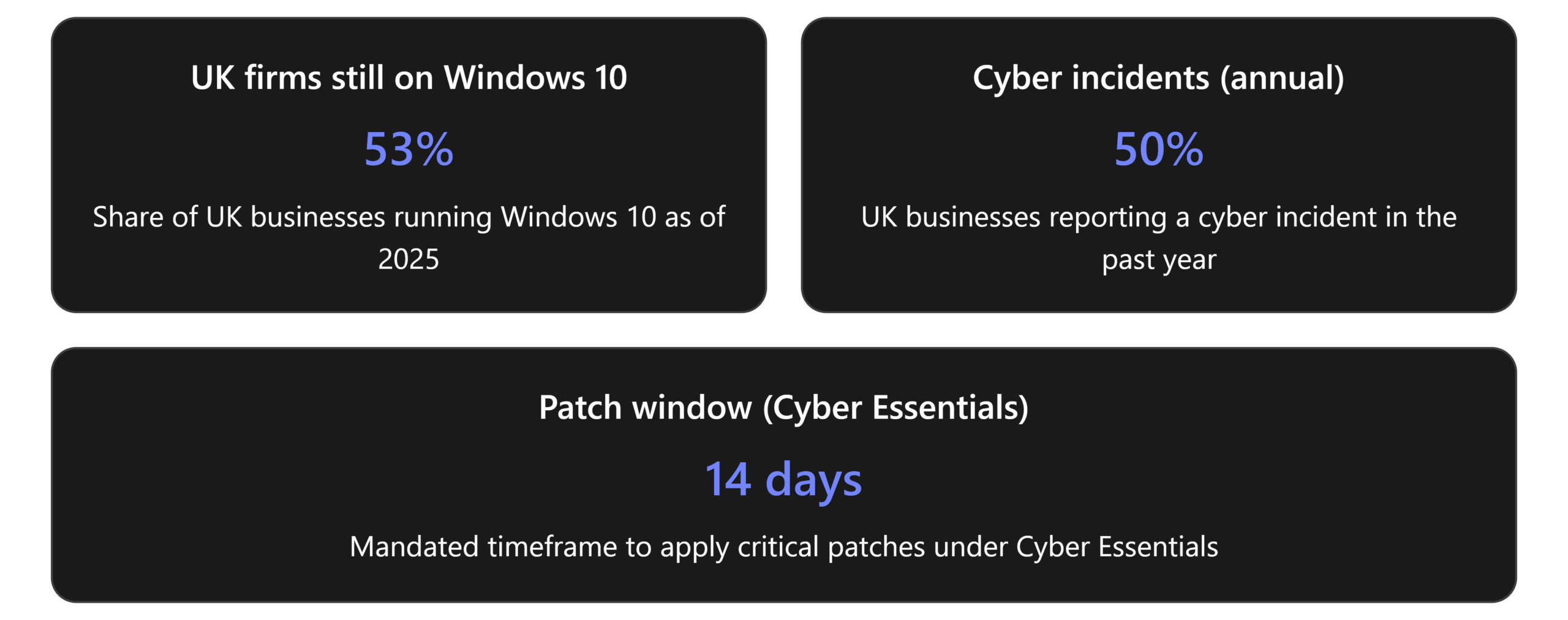
It’s not just hypothetical. As of mid-2025, an estimated 53% of UK businesses were still running Windows 10 on at least some devices – despite the ticking clock. Many have been slow to put migration plans in place. With half of UK businesses suffering a cyber incident in the last year, leaving systems unpatched is like playing with fire. The NCSC strongly advises organisations not on Windows 11 to prioritise migrating before Windows 10 “becomes legacy” in October 2025, precisely because the security risks of delay are so significant. UK industry experts echo this urgency: “after October, every new vulnerability is an open door for hackers” and older OSes are “prime targets for cyberattacks”. In other words, any Windows 10 machine you keep in service past EOL will increasingly accumulate unpatched critical flaws that attackers know about – a dangerous situation.
UK Case in Point
One NHS technology leader described the confluence of aging hardware and Windows 10’s deadline as “a tsunami of events”. During the pandemic, NHS organisations deployed thousands of laptops that are now ~5 years old – many of which cannot easily upgrade to Windows 11 due to hardware limits. Budget constraints mean not all can be replaced in time. This has NHS IT teams “scrabbling around” for solutions, and raises serious concerns: “This could put us at a greater cybersecurity vulnerability as we’ll no longer be able to have patches and security updates for those Windows 10 devices.” In response, NHS England negotiated a national Microsoft licensing deal and is urging all local NHS organisations to complete their transition to Windows 11 before support ends in October 2025. The NHS example highlights the widespread challenge – many UK organisations, large and small, face similar issues juggling upgrade costs, hardware requirements, and deadlines. But the cybersecurity stakes are clear: allowing Windows 10 systems to drift past EOL will leave critical services exposed.
Even for organisations outside healthcare, the message is the same. The longer you run unpatched, unsupported Windows 10 systems, the more “insecure and outdated” they become. Over time, not only will security threats mount, but you’ll likely encounter software compatibility trouble as vendors drop support for Windows 10. Modern applications, drivers, and peripherals will increasingly assume Windows 11 or later; sticking with Windows 10 means gradual degradation of functionality on top of growing security holes. In essence, organisations that do nothing face a double hit: escalating cyber risk and eroding operational reliability.
Patch Management and Cyber Essentials Compliance
The UK’s Cyber Essentials framework – a government-backed cybersecurity certification – squarely addresses this situation. Patch management is one of the core pillars of Cyber Essentials, stressing that all in-scope software and devices must be kept up-to-date and supported by the vendor. Under Cyber Essentials requirements, organisations must use supported, vendor-patched software; any critical or high-risk security updates should be applied within 14 days of release. Simply put, running an operating system that no longer receives security updates is not permitted. In fact, the rules are explicit: if even one device within scope is found running an end-of-life OS like Windows 10 after October 2025, the organisation will fail the Cyber Essentials assessment.
This makes sense – an unsupported system creates an unmitigated vulnerability. After 14 October 2025, a Windows 10 PC is effectively frozen with whatever last patch it got; any new flaw discovered will remain unpatched, breaching the 14-day patch rule by default. As the IASME Cyber Essentials states, from that date Windows 10 machines “are not compliant with the requirements of Cyber Essentials” because the software is no longer supported. Organisations seeking to achieve or renew Cyber Essentials will be required to upgrade those systems or remove them from scope. Failing to do so means losing certification or being unable to attain it at all.
This has serious business implications in the UK. Cyber Essentials is increasingly a prerequisite for government contracts and trusted supplier status in many industries. If your company’s certification lapses due to non-compliance, it could exclude you from tenders or partnerships that demand Cyber Essentials. Continuing to use Windows 10 beyond the EOL date “automatically results in a Cyber Essentials failure” and could even put cyber insurance coverage and client contracts at risk, since insurers and customers often require proof that software is supported. In other words, sticking with Windows 10 doesn’t just put IT at risk – it can jeopardise your compliance standing and business relationships.
Data protection law must also be considered. UK organisations handling personal data have legal obligations under the UK GDPR and Data Protection Act 2018 to secure that data appropriately. Regulators expect organisations to address known vulnerabilities; running systems with known, unpatched security holes might be deemed negligent. In fact, security experts note that using outdated, unpatched software could breach GDPR or other data protection laws. If a data breach occurs via an exploit on an unpatched Windows 10 machine, the organisation could face regulatory investigation and fines for failing to maintain “appropriate technical and organisational measures.” Thus, beyond Cyber Essentials, unsupported OSes present compliance headaches: you risk falling afoul of data protection regulations and possibly other industry-specific standards, with all the accompanying financial and reputational damage.
Summary of Key Implications
The table below contrasts the state of a fully supported system versus an unsupported Windows 10 system on these critical points – patching, compliance, and risk exposure:
Aspect |
Supported System (Windows 11 or in-support OS) |
Unsupported System (Windows 10 after EOL) |
Security Patches |
Receives regular security updates from Microsoft, closing newly discovered vulnerabilities in a timely manner. | No patches after EOL – new vulnerabilities remain unpatched indefinitely. The system grows more insecure each month. |
Threat Exposure |
Vulnerabilities are promptly fixed, keeping exposure window limited. Fewer known weaknesses for attackers to target. | High exposure – every new flaw becomes a permanent zero-day. Hackers can exploit known Windows 10 holes freely, making older systems prime targets. |
Cyber Essentials Compliance |
Fully compliant – all software is supported and up-to-date, satisfying CE requirements for patch management. | Non-compliant – any unsupported OS violates Cyber Essentials controls. (One Windows 10 device can cause an assessment failure.) |
Regulatory Compliance |
Alignment with data protection requirements is easier, as systems receive patches to maintain security. Low risk of regulatory breach due to known vulnerabilities. | Compliance risk – running outdated software can be seen as failing to protect data. Organisations risk breaching GDPR or other laws if unpatched flaws lead to incidents. |
Risk of Cyber Attack |
Reduced risk – fewer exploitable cracks in the armour. Attackers tend to focus on zero-days or misconfigurations, which are narrower when systems are patched. | Elevated risk – unsupported Windows 10 machines are expected targets. Unpatched exploits can be readily used by cybercriminals (including ransomware gangs), increasing likelihood of breach. |
Vendor Support & Fixes |
Vendor provides support, bug fixes, and technical assistance as needed. OS improvements and performance updates continue. | No vendor support – Microsoft will refuse assistance on Windows 10 issues after EOL. Only option is a paid Extended Security Updates (ESU) program to get critical patches for a limited time (essentially buying time, at increasing cost). |
Functionality & Compatibility |
Full functionality – latest features, drivers, and software are supported. New hardware and apps are designed for the current OS, often with security enhancements by default. | Degrading functionality – as time passes, new applications or devices may not work on Windows 10. No access to modern OS features (e.g. improved encryption, authentication methods), potentially impacting efficiency and security. |
Mitigating the Risk: Strategies for Resilience
Every organisation should immediately assess their Windows 10 exposure and take decisive steps to mitigate the risk.
- 🔎 Inventory and Assess: Identify all devices still running Windows 10 in your estate (including those in offices, remote or in the field). Determine which can be upgraded and which may need replacement or isolation. This assessment is the critical first step to inform your plan.
- 🆕 Upgrade or Replace: Prioritise upgrading compatible Windows 10 machines to Windows 11 (or another supported OS) without delay. For devices that don’t meet requirements, plan for hardware upgrades or replacements – don’t let old kit become your downfall. Aim to complete migration before the end-of-support or as soon as possible thereafter; each day on an unsupported OS is added risk.
- 🛡️ Extend Protection (If Needed): If some systems absolutely must stay on Windows 10 a bit longer, enrol them in Microsoft’s Extended Security Updates (ESU) to keep getting critical patches temporarily. This will maintain Cyber Essentials compliance in the short term and protect you from known threats while you finish transitioning. But set a clear deadline – ESU is a stop-gap, not a permanent solution.
- 🔒 Harden and Monitor: For any Windows 10 systems remaining during the transition, bolster your defences. Ensure they have robust MDR/antivirus active and are configured securely (disable non-essential services, enforce strong credentials, etc.). Isolate these machines from the internet or sensitive networks as far as possible. Closely monitor their activity. Likewise, double-check that all your Windows 11 devices have taken on the NCSC’s recommended secure configuration and latest patches – make the upgrade count by maximising security features.
- ✅ Verify Compliance: Review your Cyber Essentials status (or broader security compliance requirements) after taking the above steps. Update your documentation to note any use of ESU or network segregation as risk mitigations. Be prepared for your next CE assessment by ensuring no in-scope device is left in an unsupported state. Your goal is to confidently answer that all systems are either supported and patched, or exceptions are properly handled.
Time is of the essence. Microsoft’s support deadline has arrived, and the security of your organisation is on the line. Don’t wait for a breach, a failed audit, or a contract loss to force your hand. Every UK organisation – from SMEs to public sector bodies – should treat Windows 10’s end-of-life as an immediate call to strengthen cybersecurity. As the saying goes, “fix the roof while the sun is shining.” Today, you have options (upgrades, ESU, mitigations) and support available to make this transition smoothly. In a few months or a year, if attackers find a new Windows 10 exploit and you’re still running it, that sun will have long set.
Take action now
Migrate away from Windows 10, fortify your systems, and stay compliant. By doing so, you’ll not only remove a looming risk but also demonstrate to your customers, partners, and regulators that you take security seriously. In an era of relentless cyber threats, this proactive approach is the best way to protect your business and uphold your commitments to cyber and data protection.
The clock has run out for Windows 10 – make sure it hasn’t run out for your security. Act today to safeguard your organisation for tomorrow.